Designing for Delay: A Liaison UX for Prior Auth and Other Asynchronous Clinical Tasks
View on LinkedIn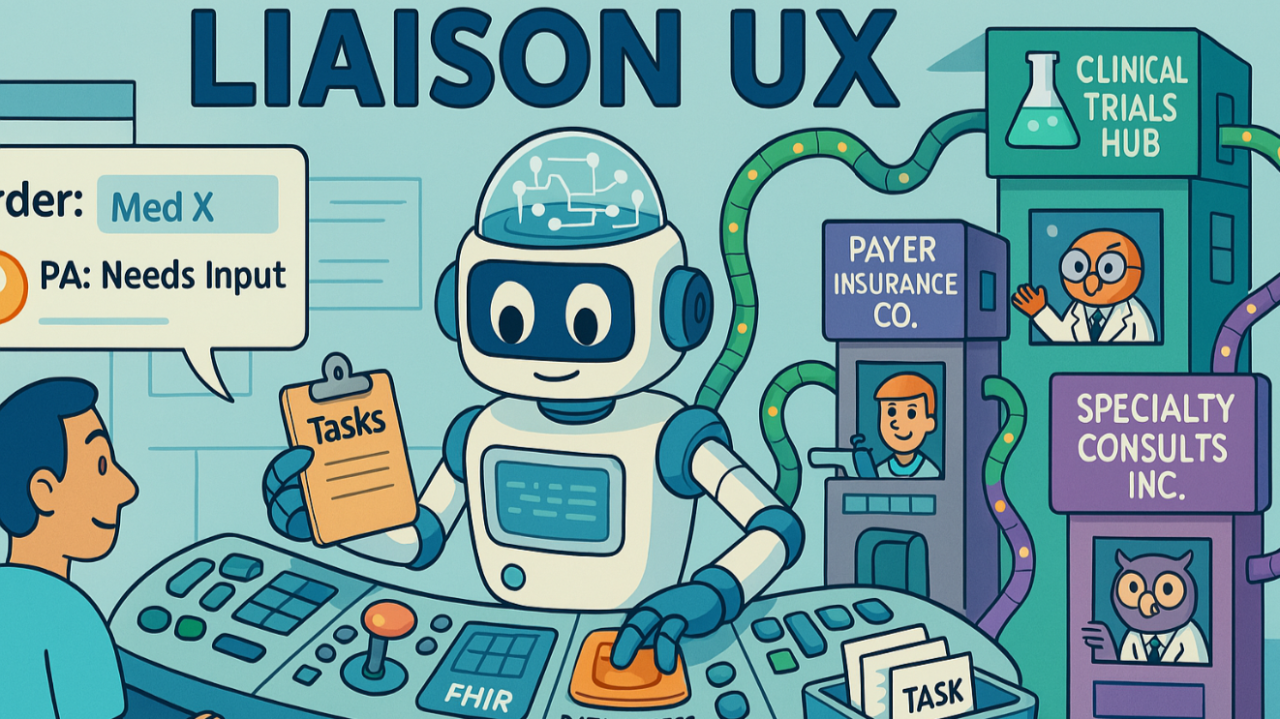
Clinical workflows are full of necessary steps that don’t happen instantly. Think about prior authorization (PA) – a classic example – but also tasks like matching a patient to eligible clinical trials, or coordinating a complex specialty consult requiring information exchange. These processes are often asynchronous, involve multiple steps, require gathering information from various sources, and can take minutes, hours, or even days.
Recently I posted about the pain points in PA workflows, asking “Prior auth is friction. Can’t we just talk?”. The core idea was exploring how LLM agents, embedded in EHRs and communicating via standardized protocols, could handle the necessary dialogue, moving beyond today’s rigid, often frustrating, structured data exchanges. This echoes challenges we faced years ago; when I first drafted the CDS Hooks specification back in 2015, we aimed to embed external logic seamlessly, but primarily focused on synchronous suggestions via static Cards. While useful, that pattern isn’t inherently designed for the persistent, multi-step, asynchronous dialogues that characterize these more complex tasks.
Last week, I shared a demo showing the “agent + tools” pattern in action, leveraging the Model Context Protocol (MCP) to let an LLM securely use tools against real EHR data fetched via SMART on FHIR. This reinforced the idea that our focus should be on robust data access (FHIR) and interoperable tool protocols (MCP), letting capable agents handle the dynamic parts.
But how do we manage these agent interactions within the EHR user experience, especially when delays are inherent? We need a more dynamic approach.
This brings us to a UX paradigm I’m calling the Liaison Model. Imagine an internal LLM agent embedded within the EHR – the “Liaison”. Its primary role isn’t to be the specialized external tool (like the payer’s PA engine), but to orchestrate the interaction with it, acting as an intelligent intermediary between the EHR user, the EHR data, and the external agent.
When a workflow event triggers a need for an asynchronous task, the Liaison initiates a Task representation. It then identifies and communicates with the appropriate external agent(s), potentially using standardized protocols like an Agent-to-Agent (A2A) framework for managing the conversation. Crucially, the Liaison leverages its secure, internal access to EHR data (via FHIR APIs) and its own toolkit (perhaps including MCP-defined tools run locally/securely) to proactively gather context and attempt to fulfill the external agent’s requests. It manages the task’s lifecycle through various states (Submitted, Working, Needs Input, Completed, Failed). While the FHIR standard itself offers a robust Task resource that could model this state in detail, the focus here is on the user-facing experience.
Perhaps the most critical function of the Liaison is mediated user interaction. It handles the automated back-and-forth with external agents. Only when it encounters ambiguity, requires clinical judgment it cannot derive, or hits a necessary human checkpoint does it pause that thread and flag the Task as needing user input, presenting a specific, targeted request within the task’s context. (At the same time, all of a Liaison’s work is transparent, available for the user to review or audit at any time.)
This UX model matters because it embraces the reality of these complex clinical tasks. Many could theoretically be fully automated, but often require human intervention for validation or handling edge cases. Even fully automated agent interactions might involve multiple turns and delays. We need a user experience that acknowledges asynchronicity, provides visibility without constant interruption, manages complexity by hiding intricate details unless requested, and facilitates focused user input when necessary.
The underlying technology – protocols like A2A for structuring dialogue, MCP for defining tool use, and agent development toolkits like LangChain/LangGraph or AutoGen for implementation – provides the necessary plumbing. This discussion centers on the UX layer built on top of that foundation. It’s about how these agent interactions manifest for the clinician within their workflow.
Here’s how the Liaison UX might look in practice:
-
Inline Initiation & Subtle Status: When a task like a PA request begins, an inline status indicator appears next to the relevant order. It’s initially unobtrusive – perhaps a small, grayed-out icon or highlight with brief text like “PA: Submitted”. The user acknowledges the background process and continues working.
-
Louder Signal for Action: If the Liaison needs human input, the indicator becomes visually “louder” – a more prominent icon (maybe a question mark) in a noticeable color (like amber), with text like “PA: Needs Input”. It attracts attention to the specific item requiring action.
-
Contextual Task Details Panel: Clicking the indicator opens a dedicated panel. This provides the current status, a transparent message history showing the Liaison-Agent interactions and the reason for needing input, any generated artifacts (like draft forms or results), and importantly, a focused input area that only appears when the status is “Needs Input”, presenting the specific question from the Liaison.
-
Seamless Handoff & Quiet Resumption: The user provides the requested information in the panel. The Liaison processes it, sends it along, and the inline indicator reverts to its quieter “Working” state. The input area disappears, and the task continues in the background.
-
Clear Completion Indicator: Once the task finishes, the inline indicator shows a clear final state – a success icon (checkmark) with “PA: Approved” or a failure icon with “PA: Denied”.
-
The Task Inbox: Integration and Overview: While inline indicators offer context, clinicians need a consolidated view. Liaison-managed tasks can be aggregated in a dedicated panel or, ideally, integrated directly into existing EHR task systems. This view lists tasks across patients, clearly highlighting those needing user input for prioritization. Herein lies a key advantage: instead of needing deep, bespoke EHR integrations for every external agent service, the EHR integrates once with the Liaison framework via standard protocols (A2A, MCP). The Liaison LLM acts as the adaptable bridge, translating the diverse requirements and dialogues of various external agents into a consistent task representation suitable for the EHR’s task system. This significantly lowers the barrier for incorporating multiple useful agent-driven services.
This Liaison UX pattern aims to gracefully handle delays, orchestrate complexity behind the scenes, increase transparency, minimize user burden by focusing interactions, and maintain context while offering a consolidated overview. Crucially, it enables scalable integration of diverse asynchronous services through standardization.
As AI agents become more embedded in healthcare, effectively managing these asynchronous interactions is vital. The Liaison model, leveraging standard protocols and focusing on a human-centered UX that designs for delay, offers a path toward more seamless, efficient, and scalable integration of agentic capabilities into the reality of clinical work.
Follow-up post with live demo: https://www.linkedin.com/m/pulse/conversational-interop-prior-auth-demo-josh-mandel-md-wjwxe