MCP in Your Browser: Secure, Local LLM Tools with postMessage Transport
View on LinkedIn
We want agentic AI systems to handle real work (e.g., kick off a prior authorization or summarize glucose management history).
Model Context Protocol (MCP) provides a standardized specification for these agent-to-tool interactions. But MCP’s standardized transports (stdio and Streamable HTTP) present limitations when tools need access to sensitive data or local resources.
[LinkedIn Article: 7649045515662125032]
Let’s be precise about the problems.
- Streamable HTTP transport typically expects the tool server – and potentially the sensitive data it operates on – to live outside the user’s machine, often managed by a third party. (Running a web server locally has downsides similar to stdio regarding installation and management). Transmitting health data across the network to such a remote server is often unacceptable due to privacy regulations and risk. Furthermore, compromising that single, centralized server could potentially expose the data or credentials for its entire user population.
- stdio transport keeps communication local but forces users to download, install, and run specific executables. This is a non-starter in many enterprise environments, unusable on mobile platforms, and creates a local process that might interact with the local environment in malicious or surprising ways.
Neither transport adequately addresses the need to connect a web-based LLM UX (like the interfaces provided by major AI labs) to tools that must operate securely on local or sensitive data, especially in consumer scenarios where there’s no trusted enterprise host available.
There is room for a transport that functions entirely within the browser’s security context. Security is enabled by leveraging the browser’s inherent policies and APIs, like mutual origin validation, allowing the client and server frames to strictly control who they communicate with. This allows tools to access data loaded into the browser or utilize browser APIs without exposing that data externally and without requiring any local software installation. This specific requirement is met by the postMessage Transport for MCP.
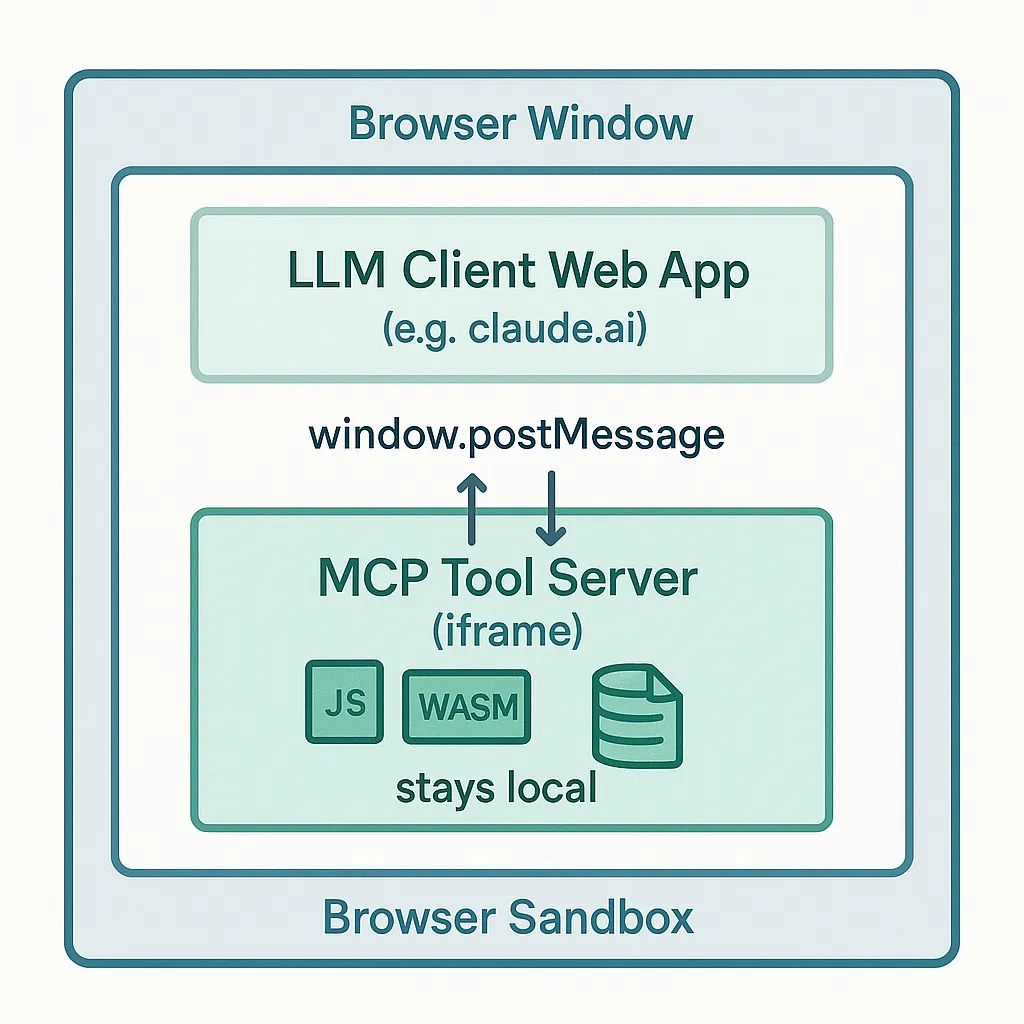
Introducing the postMessage Transport
The postMessage transport mechanism is straightforward. A web-based LLM client page loads an MCP tool server – which is just another web page – into a hidden
This browser-native approach offers distinct technical advantages, particularly strong for consumer applications or scenarios without a trusted enterprise API host:
- Data Confinement: Sensitive data loaded into the server iframe (e.g., FHIR resources fetched via SMART on FHIR) remains within the browser sandbox. It is not transmitted over the network to the tool server for processing, fundamentally improving privacy for applications like patient data analysis.
- Zero Installation: The tool “server” consists solely of web assets: HTML, JavaScript, CSS, potentially WebAssembly (WASM). My demonstration server runs entirely from static files hosted on GitHub Pages. Providing users with static tool applications they can run locally within their browser sandbox is a viable and secure deployment model.
- Direct Browser API Access: The server iframe can directly and securely utilize powerful web platform APIs, gated by standard browser permissions. This includes IndexedDB for structured local storage, WASM for high-performance local computation, the File System Access API for operating on user-selected local files, or even Web Bluetooth / Web USB for interacting with connected hardware.
- Reduced Credential Risk: Compared to remote servers or broadly permissioned local processes, the postMessage tool server often has a reduced need to store persistent, high-privilege credentials. It might receive data directly via user interaction or use ephemeral tokens, limiting the potential impact if the tool server’s logic itself were somehow compromised.
Demo: Real EHR Data Analysis, Entirely In-Browser
To demonstrate this isn’t just theoretical, I’ve recorded a short video [Link to Video Here] showing the postMessage transport used with the standard MCP Inspector tool.
In the :
- The MCP Inspector connects via postMessage transport to my static tool server on GitHub Pages.
- The server iframe initiates a SMART on FHIR launch. I authenticate against my provider’s MyChart portal and authorize data access.
- The requested FHIR data is fetched directly into the browser, where the server iframe uses IndexedDB to store the complete dataset locally.
- Data delivery is confirmed back to the client via postMessage.
- The Inspector then uses standard MCP tools/call requests via postMessage to invoke tools like grep (searching FHIR resources + notes) provided by the iframe server.
All analysis occurs locally, sandboxed, demonstrating secure processing of actual health data without it leaving the browser and without any required installation.
Beyond EHR: Diverse Use Cases for Browser-Native Tools
The utility extends beyond healthcare data. Consider an LLM agent using a postMessage tool server to:
- Summarize content from local files selected by the user via the File System Access API.
- Perform complex image manipulations or run physics simulations using WASM modules loaded in the iframe.
- Read data from or send commands to a connected Bluetooth Low Energy device via the Web Bluetooth API.
- Act as a temporary, secure “scratchpad” for analyzing code snippets or log data pasted or loaded into the iframe.
Security Considerations: Leveraging the Sandbox
Building securely with this transport means working with the browser’s security model:
- Leverage Browser Mechanisms: Use strict origin validation (event.origin checks) and consider the iframe sandbox attribute to enforce the principle of least privilege between the client and the tool server frames.
- Respect User Consent: Access to powerful browser APIs (files, devices, etc.) relies on explicit user permission granted via standard browser prompts to the tool server’s origin.
- Tool Logic Matters: Remember, a secure transport doesn’t fix insecure application logic within the tool itself.
Call to Action: Let’s Build Browser-Native AI Connections!
The postMessage transport enables compelling new workflows. Imagine web-based LLM interfaces like claude.ai, chat.openai.com, or custom enterprise portals securely interacting with tools that operate on local data or leverage specific browser capabilities, all without installations or sending sensitive data off-device.
This is technically feasible now. The prototype, built with standard web technologies, demonstrates this. Adding client-side support for the postMessage transport to existing web-based LLM platforms does not require fundamental backend infrastructure changes.
I invite developers and platform providers to explore this:
- Watch the demonstration video:
- Review and comment on the postMessage Transport Proposal
- Examine the prototype code (client transport, server example):
- Experiment using the MCP Inspector tool to connect to postMessage servers.
What specific use cases does this unlock for your applications? How can we collectively encourage the major LLM platforms to support this transport? Let’s discuss the technical merits and possibilities in the comments.