o3 Meets The Enigma: A Tale of AI, Puzzles, and Prompt Engineering
View on LinkedIn
I accidentally hoarded OpenAI o3 query credits this month (the psychology of scarcity in the ChatGPT “Plus” tier!). Fortuitously, this left me with 50 queries to burn on testing o3’s new vision and reasoning capabilities. The goal? A task I’ve tried on many vision language models over the years without success: “Turn this image into clean JSON defining the grid structure.”
Getting an AI to accurately transcribe a barred cryptic crossword grid has been surprisingly tough. These examples come from “The Enigma,” the monthly puzzle bible from the National Puzzlers’ League (NPL – great org, check them out if you love wordplay; e.g. see this mini-sample issue.)
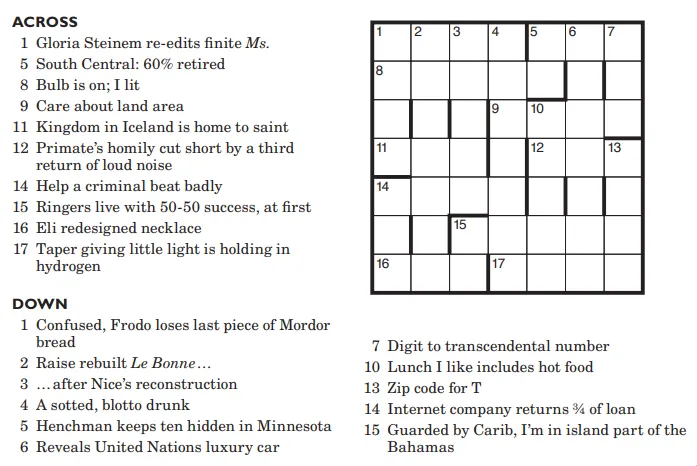
A sample cryptic crossword grid from The Enigma
Why Do Crossword Grids Challenge AI Vision?
Unlike standard crosswords, barred grids don’t use black squares. Every square gets a letter. You figure out where words end based on the thickness of the lines between cells. A thick ‘bar’ stops a word; a thin line doesn’t. Add small clue numbers in the corners, and what looks like a simple regular structure to the human solver becomes a substantial hurdle for AI. Visually parsing the grid requires the ability to understand large- and small-scale structures, and to make hundreds of binary (thick-vs-thin) judgments without fail.
Round 1: o3 Tries to Eyeball It (and Fails for 5 Minutes x5 tries)
My first shots were direct: “o3, here’s the grid image. Transcribe it to JSON, noting thick vs. thin bars.” o3 spun its wheels for a good five minutes on average. You could see the gears turning – it was cropping the image, zooming in on sections, even writing and running Python snippets using image processing libraries to try and detect lines or analyze pixel density. It knew it was looking at a grid.
But the output was unusable:
- Bad Dimensions: It hallucinated grid sizes, like guessing 15x15 for my sample 12x12 grid.
- Inconsistent Bars: The crucial thick-vs-thin distinction was a mess. It would get some right, some wrong, with no apparent pattern.
- Missing Numbers: Clue numbers were just ignored.
- Truncated JSON: It even gave up partway, literally outputting ”… (eight more row-arrays omitted for brevity)…” which defeats the whole purpose!
Clearly, even with its tool use, o3’s direct visual analysis couldn’t reliably nail the required precision for this specific task. It could see, but not accurately interpret the fine details consistently.
Round 2: “Don’t just do this one task; build a general-purpose solver!”
This failure sparked a change in my prompting strategy. o3 is great at coding. What if I asked it to build a program to solve the transcription, instead of doing it directly? I refined the prompt:
“Hint: your safest bet is to create a program that will perform this task reliably on any page from The Enigma… grids might have different dimensions. As you write the program, visually debug each step… then run it start to finish.”
I was explicitly telling it: don’t trust your eyes alone; trust your code, and verify with your eyes. Build something robust.
o3 Engineers the Solution
That did the trick. o3 shifted focus to writing a Python script using OpenCV:
- It loaded the image and robustly found the grid boundaries.
- It detected all horizontal and vertical lines.
- Crucially, it implemented functions to measure the pixel thickness of each line segment, allowing it to reliably classify them as ‘thick’ or ‘thin’ based on a threshold.
- For clue numbers, it smartly applied logic: instead of OCR, it calculated where numbers should be according to standard crossword rules (a word starts after a grid edge or a thick bar).
- It packaged everything into a clean JSON structure with dimensions, bar locations (e.g., vertical_bars[row][col] indicating if the bar to the right of cell (r,c) is thick), and the derived numbers.
And thanks to the “visually debug” instruction, it ran its own code, showed me intermediate outputs like overlays of detected bars, and refined the thresholds and logic as it went. It wasn’t just coding; it was engineering a solution.
Bringing the Tool to Life
With the core logic proven in Python, I had o3 translate the whole thing into a standalone HTML/JavaScript web app using Canvas. A bit more iteration, and the result is a simple page where you can upload an image and get the analysis done right in your browser.
Link to the web app: https://chatgpt.com/canvas/shared/6812e9917874819197965ba56018198d
Just drop in a full Enigma page or a cropped grid (e.g., try the sample image above). The script locates the grid, filters out page noise, identifies bars, auto-numbers the cells, and gives you the JSON.
Takeaways: o3, Prompts, and Precision
This exercise was a great microcosm of working with advanced AI:
- Reasoning & Coding are Strengths: o3’s ability to understand the goal, devise a multi-step algorithm, write complex code (Python/JS), use tools (code execution, image analysis), and debug is phenomenal.
- Vision Has Limits (for now): High-precision visual tasks requiring consistent interpretation of subtle geometric features are still challenging for direct analysis. o3 knew it was struggling, but couldn’t overcome it visually.
- Meta-Prompting Works: Shifting the prompt from “do the task” to “build a tool for the task” allowed o3 to leverage its coding strength to bypass its visual weakness for this specific problem. That strategic redirection was key.
- AI as Tool-Builder, Not Just Task-Doer: The most effective use here wasn’t asking o3 to be the grid transcriber, but to create the transcriber.
While o3 needed specific guidance to nail this particular visual puzzle, its ability to then engineer a robust, algorithmic solution is incredibly promising. Give the detector tool a spin!
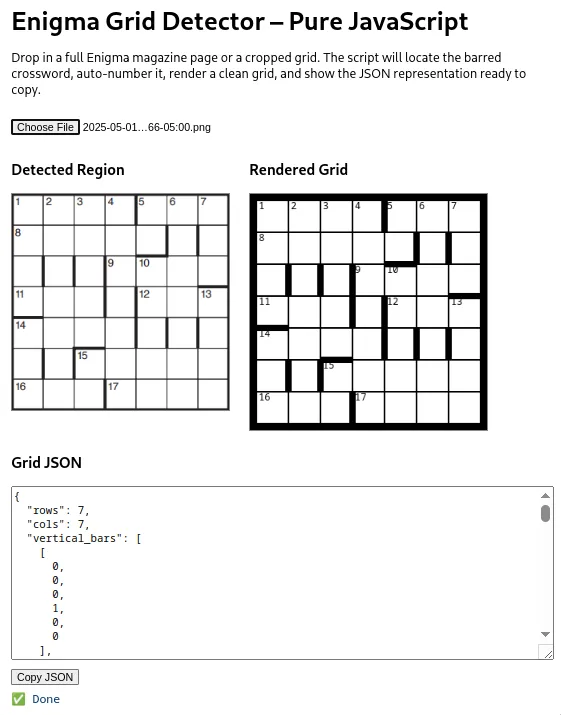
Web app in action!